dimmi agent
Write procedures
Write step-by-step support playbooks for the dimmi agent in plain English, enforce hard limits, and publish safely.
Help articles work great when customers ask how something works. They are not enough when a customer needs action, like refunding a duplicate charge or changing an account email.
Procedures let admins write those team playbooks in plain English under Procedures in the sidebar. Instead of stuffing every policy into one big prompt, you give the dimmi agent clear, ordered steps for each request, and dimmi holds the agent to the rules that must happen.
Procedures vs. workflows
Section titled “Procedures vs. workflows”Both automate support work, so pick the right tool for the job:
- Procedures guide the dimmi agent through chats that need conversation, follow-up questions, or policy checks.
- Workflows run fixed rules that act the same every time without AI: routing chats to teams, adding tags, setting SLAs, and sending follow-ups.
Example: refunding a duplicate charge
Section titled “Example: refunding a duplicate charge”Every procedure has three parts: When dimmi uses this (when to trigger), ordered Steps, and Hand over to the team when (when to stop and bring in a human).
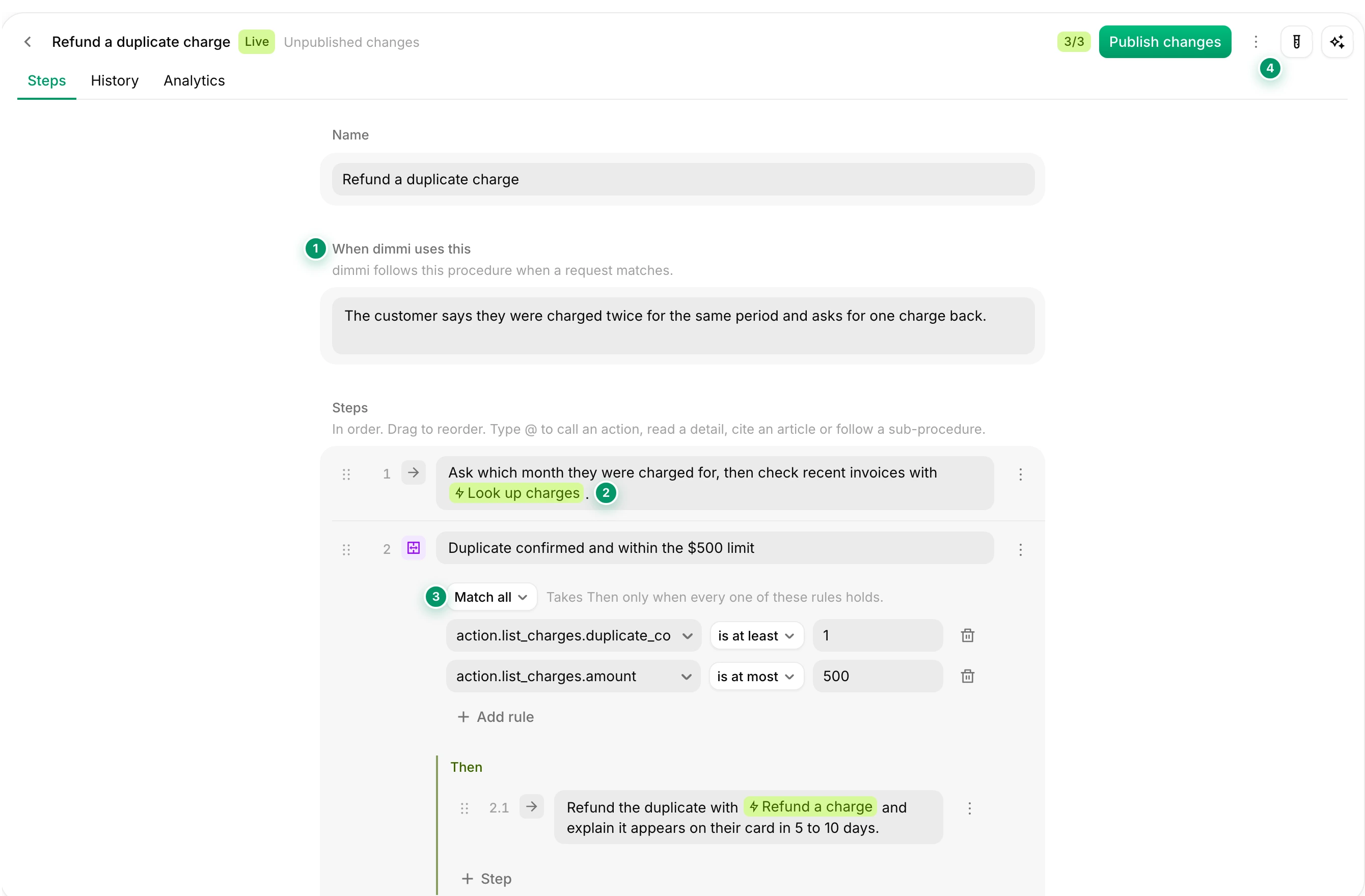
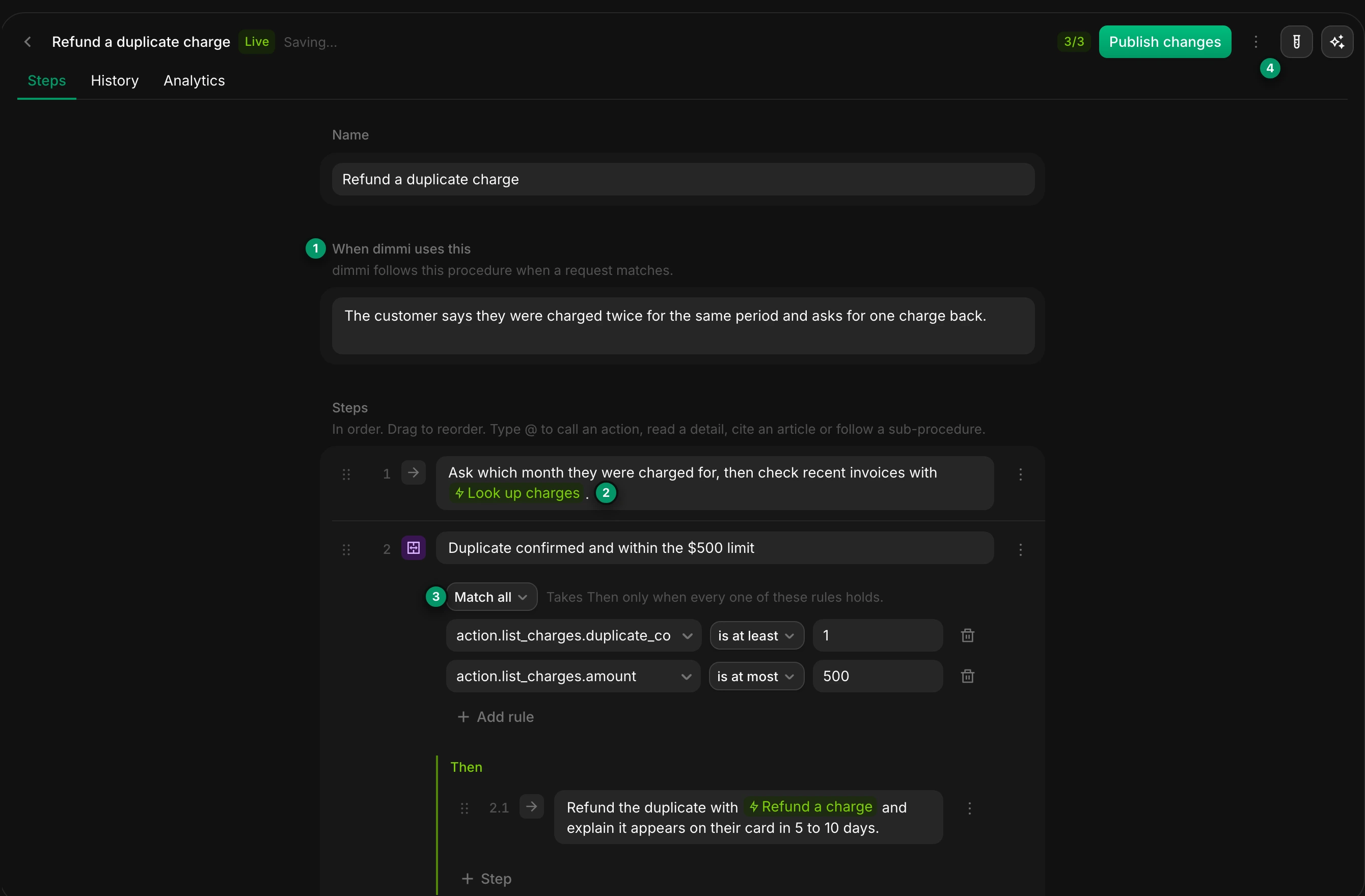
- When dimmi uses this: describes the customer request in plain words so the agent knows when to pull up this playbook.
- Inline
@action chip: binds a real action directly inside a step, so the agent checks recent charges before moving on. - Exact rule branch: checks the refund limit directly and hides the unused side, so the agent cannot refund over $500.
- Testing and publishing bar: opens Preview and Simulations beside the editor and shows how many saved tests pass before you click Publish.
Here is another common example, written for damaged orders:
- When dimmi uses this:
The customer wants a refund for an order that arrived damaged. - Step 1 (Instruction):
Ask for the order number, then look it up with @Look up order. - Step 2 (Rule):
contact.attr.plan is prooraction.lookup_order.days_since_purchase is at most 30- Then:
Refund it with @Refund order and tell them when the money arrives. - Else:
Explain the 30-day policy from @Refund policy and offer store credit with @Issue credit.
- Then:
- Hand over to the team when:
The customer mentions a chargeback.
With this setup, Step 2 waits until Look up order finishes, dimmi picks the matching side automatically so the agent never sees the other side, and Refund order cannot run before the lookup.
How the agent picks and keeps a procedure
Section titled “How the agent picks and keeps a procedure”On every customer message, the dimmi agent sees the name and When dimmi uses this text of each live procedure that applies to the chat. When the chat matches one, the agent loads its steps before searching your docs.
From then on, dimmi keeps the procedure for that chat across messages. Each new reply starts with the steps marked done, the step that comes next, and what the procedure’s actions returned so far.
One step at a time
Section titled “One step at a time”The agent follows a procedure as a conversation, not a checklist dumped in one message:
- A step that asks waits. When a step asks the customer something, the agent asks it and stops. Later steps and handovers wait for the reply.
- A step takes as many exchanges as it needs. A step like
Find out what went wrong with the ordercan span 4 or 5 messages. The agent asks follow-ups and moves on only when the step is done. - Steps needing no customer input run together. After a customer replies, the agent can look up the account and explain the result in one message.
- Steps do not finish early. Before leaving a step that asks something, dimmi confirms the customer actually gave what the step needs.
- Customers never repeat themselves. A customer who writes
Cancel my plan, it costs too muchalready answeredAsk why they want to cancel, so dimmi marks that step done before replying.
These checks work in any language your customers write.
The procedure ends when every required action on its path has run and no step remains, the agent finishes the last step (or the customer changes topics), or a teammate replies, closes, or hands over the chat.
With more than 15 procedures that apply to a chat, dimmi offers the agent the 12 whose description is closest to what the customer wrote. A procedure the chat is already following always stays in the list.
Drafts, publishing, and pausing
Section titled “Drafts, publishing, and pausing”You can write and edit procedures without disrupting live chats:
- Drafts stay private: a new procedure starts as a draft the agent never sees until you click Publish.
- Safe edits: changes to a live procedure save to a working copy while customers keep getting the published version. Edits go live only when you click Publish changes.
- Checks before going live: dimmi blocks publishing if a step is empty or any chip points at something missing (an unpublished action or article, or a deleted team, tag, ticket type, or audience).
- Quick pause: Turn off, in the header’s ⋯ menu, stops the agent from using a procedure right away while keeping all your steps. Delete procedure sits in the same menu.
- Triage-only mode: if Agent’s role is set to Triage only in agent settings, the agent skips all procedures.
Procedures written before @ chips and exact rules keep working as they are. An older standalone Action step counts as a required action chip.
Rules and limits
Section titled “Rules and limits”| Limit | Value |
|---|---|
| Top-level steps | 1 to 30 |
| Total steps including nested then and else steps | 80 |
| Length per step | 1,000 characters |
| When dimmi uses this | 500 characters |
| Handover rules | 10, each up to 300 characters |
| Then and else nesting | 2 levels deep |
| Rules per condition | 10 |
| Sub-procedure depth | 3 |
| Reminders before a safety handover | 3 |
| Simulations per procedure | 100, each with 1 to 12 customer messages and up to 30 checks |
| Simulations per run | 20 |
Next, learn how to build branches and safety checks in Steps, chips, and rules, test drafts in Test procedures, or track live results in Versions and analytics. The API reference covers the preview, simulations, versions, and scorecard endpoints.