Messenger
Verify customer identity
Sign short-lived JWTs on your server so the messenger knows which customer is signed in and trusts their attributes.
With identity verification, your server signs a short-lived JWT for the logged-in user. The messenger sends that token to dimmi and signs the visitor in as the customer matching its sub claim.
Create a signing secret
Section titled “Create a signing secret”Open Settings → Identity verification, create a Shared secret (HS256), and save both values in your server environment:
DIMMI_IDENTITY_SECRET=dmi_idsec_<secret>DIMMI_IDENTITY_KID=isk_<key_id>Prefer asymmetric keys (RSA, P-256, or Ed25519)? Add your public key in dimmi and set DIMMI_IDENTITY_PRIVATE_KEY to your private key PEM on the server.
Sign tokens on your server
Section titled “Sign tokens on your server”@dimmi/server and @dimmi/nextjs read those environment variables automatically and sign tokens valid for 600 seconds by default (expiresIn, up to 3,600 seconds).
npm install @dimmi/nextjsimport { clerk } from "@dimmi/nextjs/clerk";import { defineDimmi } from "@dimmi/nextjs/config";
export default defineDimmi({ identify: clerk() });"use server";
import { identityToken } from "@dimmi/nextjs/server";
import config from "../dimmi.config";
export async function dimmiToken() { return identityToken(config);}import { Dimmi } from "@dimmi/nextjs";import type { ReactNode } from "react";
import { dimmiToken } from "./dimmi-token";
export default function RootLayout({ children }: { children: ReactNode }) { return ( <html lang="en"> <body> {children} <Dimmi appId="<app_id>" host="https://trydimmi.com" identity={dimmiToken} /> </body> </html> );}| Auth library | identify helper |
Import |
|---|---|---|
| Clerk | clerk() |
@dimmi/nextjs/clerk |
| Auth.js | authjs(auth) |
@dimmi/nextjs/authjs |
| Supabase | supabase() |
@dimmi/nextjs/supabase |
| Better Auth | betterAuth(auth) |
@dimmi/nextjs/better-auth |
| Custom auth | Function returning a user object or null |
None |
npm install @dimmi/serverimport { dimmiIdentity } from "@dimmi/server/express";import express from "express";
const app = express();
// Your session middleware sets req.user.app.get( "/api/dimmi/token", dimmiIdentity((req) => req.user ? { id: req.user.id, email: req.user.email, emailVerified: req.user.emailVerified } : null, ),);
app.listen(3000);The user object accepts id (required), email, emailVerified, name, phone, avatarUrl, locale, timezone, signedUpAt, company, and attributes.
Our Go, PHP, Laravel, and Python SDKs also include token helpers. If you use a generic JWT library, pass the full dmi_idsec_ string as the HMAC key without base64-decoding it, and include the key ID in the kid header.
Pass the token to the messenger
Section titled “Pass the token to the messenger”In Next.js, pass your server action to the identity prop. In other frameworks, choose one of two options:
identityUrl(data-identity-urlon the script tag): a same-origin endpoint (like/api/dimmi/token) returning200with{"token": "<jwt>"}, or{"token": null}when signed out.identity: a function that returns the JWT string ornull.
The messenger fetches a token on page load. In single-page apps, call identify() after login and shutdown() after logout (refreshDimmiIdentity() and dimmiLogout() in @dimmi/nextjs).
Supported JWT claims
Section titled “Supported JWT claims”sub and exp are required. Invalid optional claims are dropped.
| Claim | Rule |
|---|---|
sub |
Your user ID (1 to 255 characters). |
exp |
Expiration Unix timestamp, at most 7 days after iat. Allows 60 seconds of clock skew. |
aud |
dimmi, the messenger’s app ID, or the workspace ID. Omit to accept any messenger. |
nonce |
Up to 128 characters. Tokens with a nonce can only be used once. |
email |
Up to 254 characters. |
email_verified |
Set true to mark the email verified and link past email conversations. |
name |
1 to 120 characters. |
phone |
E.164 format, such as +14155550100. |
avatar_url |
https URL, up to 2,048 characters. |
locale, timezone |
Language tag (like en-US) and IANA time zone (like Europe/Paris). |
company |
Object with id (required), name, domain, and custom_attributes. |
custom_attributes |
Up to 100 keys (lowercase letters, digits, underscores, starting with a letter). Values can be numbers, booleans, strings up to 1,024 characters, or null to clear. |
Only verified token attributes (or API/import attributes) can be bound into dimmi agent actions.
Reuse your auth provider’s tokens (JWKS)
Section titled “Reuse your auth provider’s tokens (JWKS)”To skip signing your own tokens, create an Auth provider key set (JWKS) secret with your provider’s JWKS URL, then pass your provider’s session JWT via identity. Leaving Issuer blank defaults to the JWKS URL without /.well-known/.
Rotate or revoke secrets
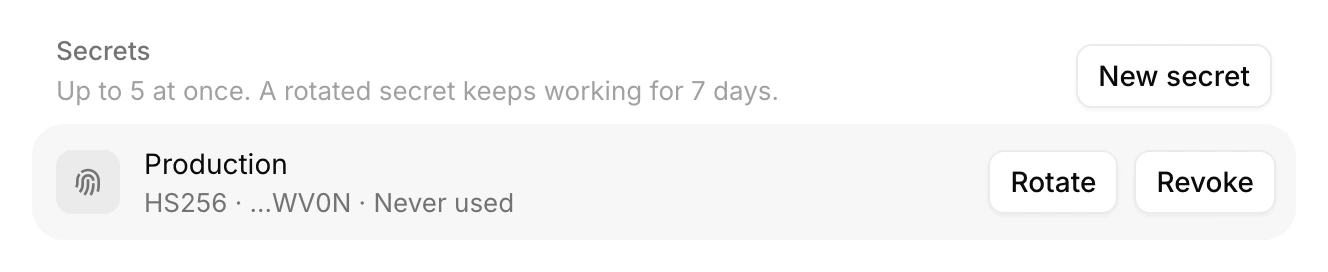
Section titled “Rotate or revoke secrets”- Rotate: generates a new secret while keeping the old one valid for 7 days.
- Revoke: invalidates the secret right away, signs out every session created with it, and cannot be undone.
Limits
Section titled “Limits”| Limit | Value |
|---|---|
| Max token size | 8 KB |
| Messenger session lifetime after last verified token | 24 hours |
| Secrets per workspace | 5 |
Debug tokens or require sign-in
Section titled “Debug tokens or require sign-in”Paste any JWT into Check a token under Settings → Identity verification to inspect its claims and see why a token was rejected. On the same page, switch sign-in mode to Required to hide the messenger from signed-out visitors.